


- Sleek elegant design
- Long-lasting battery
- Bluetooth performance issues
Recently, I reviewed the Flydigi Apex 5 controller and was pleasantly surprised by its responsive controls and sleek design. So, when I got the opportunity to test out the Flydigi Vader 5 Pro, I jumped at the chance. This latest model in the Vader series promises a long-lasting battery and mappable bonus buttons.
Unboxing the Flydigi Vader Pro 5
Securely nestled in plastic packaging, the Vader 5 Pro comes in a black cardboard box. Within the box, you’ll find the controller, a charging cord, and a user manual. When removing the controller from the black plastic packaging, be sure to grab the extra paddle buttons nestled against it. These fellas blend in with the packaging and are easy to overlook.Black with gold accents, the Vader 5 impresses with its stylish high-end look. It features the iconic Xbox shape and button layout with diagonal joysticks. On the front of the controller are all the typical buttons you’d expect, as well as C and Z buttons to the right of the right joystick. The joysticks themselves are surrounded by textured golden rings that lend this new device an air of elegance.
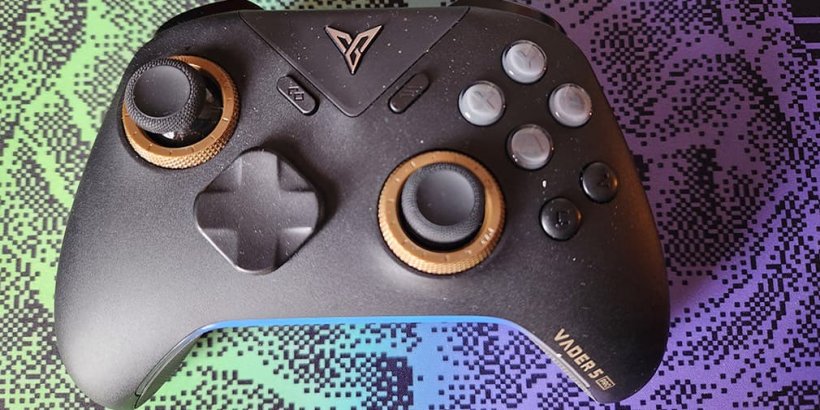
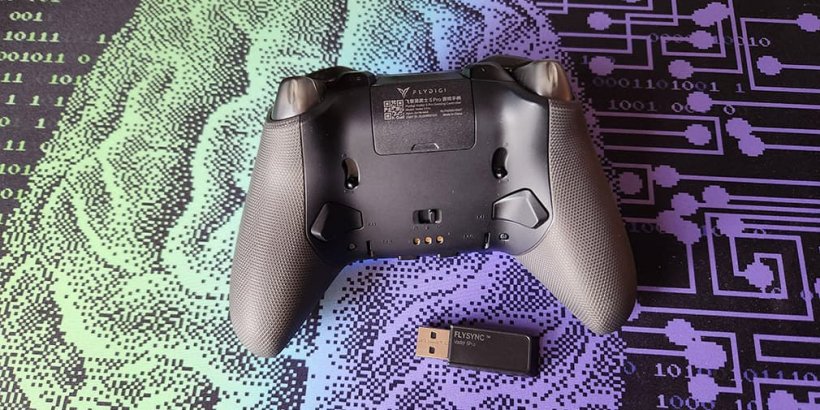
Atop the device are the standard trigger and bumper controls. There’s also an extra set of mini bumpers located beside the triggers. On the back of the controller are a set of paddles, a toggle switch, and, towards the bottom, Turbo and Fn buttons. Near the top of the back is a removable cover, underneath which is a holder slot.
Gaming on the Flydigi Vader 5 Pro
Compatible with Android, iOS, Switch, and PC, Flydigi’s latest controller passes the test when it comes to comfort and usability. The rubber grips prevent slippage during intense play sessions. The joysticks are responsive with no drift, and the rubberised texture keeps your thumbs on point.Gaming on mobile with the Vader 5 Pro was a delight. Just make sure the toggle on the back is centred for Bluetooth mode, pair with your device, and you're good to go. Between putting the pedal to the metal in Disney Speedstorm, gunning down horrific creatures in Wall of Insanity, and solving puzzles in a building full of haunted mannequins in Forgotten Memories, I only ever experienced one issue.

At one point, when attacking monstrosities in Wall of Insanity, my gun repeatedly fired despite having let go of the bumper. However, it didn’t happen again during the rest of my playtesting.
The joysticks move fluidly and snap back into place when you release them. The buttons are responsive and, for the most part, ideally spaced. My only issue is that the C and Z buttons are a little too close to the A button. This makes it easy to tap them by mistake, especially if you’re used to a controller without these bonus buttons.
The Flydigi Vader 5 Pro Has a Long Battery Life
The device comes with a dongle, which you can use to connect it to your PC. The Vader 5 Pro stands up to the pressure even during intense battle. Whether exploring apocalyptic England in my favourite mod, Fallout: London, battling robots in Atomic Heart, or waging war on evil aliens in High on Life, this sleek controller’s sturdy joysticks and quick rising buttons let me battle baddies to my heart’s content.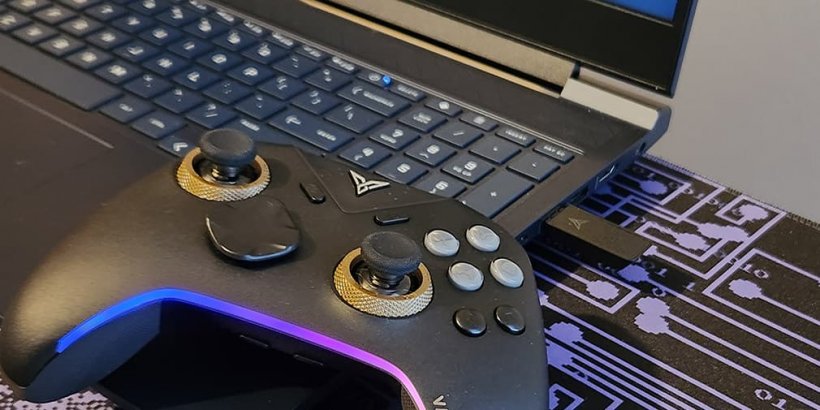
It’s always disappointing when your controller battery dies mid-battle, which is why it’s vital that wireless controllers have strong batteries. Luckily, the newest Flydigi controller’s 1000mAh battery lets you play for hours on end without needing to recharge. I was able to use the controller for a good ten hours before even considering plugging it in.
Fairly lightweight and about the size and shape of an average Xbox series s/x controller, the device offers a familiar, comfortable feel. Taking a page from Microsoft’s book, the latest Vader controller is designed to fit comfortably in your hands even during prolonged use. I was able to spend hours immersed in Wall of Insanity without ever feeling the slightest discomfort.
The Flydigi Vader 5 Pro May Have Connectivity Issues
To turn on Turbo mode, map buttons, and otherwise customise your experience with this controller, you’ll need to download the Flydigi app and pair it. Unfortunately, when attempting to pair with the app, I found the latest model is not yet supported, making it difficult to test app-based customisations.
I tried unpairing the device from my iPad and re-pairing to see if it fixed the problem. Sadly, this led to a strange issue where the Bluetooth toggle on the back of the device stopped working correctly.
When attempting to pair with a mobile device via Bluetooth, the controller's light flashes blue until it connects. However, with my failed attempt to pair with the app, the light flashed yellow, which is what you’re supposed to see when connecting to a PC.
Neither my iPad nor my Samsung Galaxy S22 could pick up a Bluetooth signal from the Vader 5 Pro anymore. While it could easily be that I simply received a defective device, I wasn’t able to get my hands on a second device to compare.
A Promising Controller With a Worrying Flaw
Overall, the Flydigi Vader 5 Pro provided an enjoyable experience. The buttons are responsive and the joysticks allow for precise, fluid movement. The black-and-gold aesthetic is stunning, and the battery life is very impressive. Though it may well be a fluke, the issue with Bluetooth ceasing to work after a few days is concerning. If you’re looking for a beautiful controller for gaming on your PC, the Vader 5 Pro is a decent choice. However, I’d be wary about recommending it for mobile gaming.Flydigi Vader 5 Pro Controller review - "A stylish device with performance issues"
The Flydigi Vader 5 Pro is an aesthetically stunning, lightweight controller with responsive controls. Unfortunately, the issue with the Bluetooth connection failing after a few days makes getting this controller for mobile a risky choice.


Jack Brassell
Jack Brassell is a self-proclaimed nerd with a lifelong passion for storytelling. An aspiring author, Jack writes mostly horror and young adult fantasy. She is currently working to attain an associates degree in game design.