Rainbow Six Mobile controller support - Is the touchscreen enough to win?
Skill issues and wonky controls - do you have to fuss about all these things on the road to victory? More importantly, is there Rainbow Six Mobile controller support?

After waiting (impatiently) for so long to see Rainbow Six Mobile officially launched, many players find themselves face to face with a rather peculiar question: "Does Rainbow Six Mobile have controller support?" I've wondered this myself, a few years ago, when I first learned about R6M - and today, I'm here to answer your question.
Here is everything you need to know about controller support, compatibility, and whether it is actually worth using one.
Does Rainbow Six Mobile have controller support?
Rainbow Six Mobile does offer controller support - Ubisoft has addressed this before, mentioning that "Rainbow Six Mobile’s Soft Launch will have early Controller in -game support. Note that controllers won’t work on menus."Note that some players might report limited functionality when connecting Bluetooth controllers, meaning:
- No guaranteed button mapping
- No official optimisation for controller layouts
- Possible input issues or partial functionality
- Risk of inconsistent performance
Ubisoft has focused heavily on touchscreen optimisation, with fully customisable HUD layouts, sensitivity controls, and aim settings built specifically for mobile play.
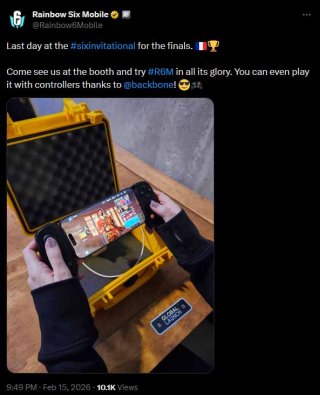
Why controller support is a big deal in competitive shooters
In FPSes like Rainbow Six Mobile, precision is everything. Everything is about quick movements, tight angles and split-second decisions. For those typically playing Xbox or PlayStation (with a controller), this can translate to much easier mobile adaptation.Controllers can offer:
- Physical triggers for more consistent firing
- Analog sticks for smoother movement
- Familiar console-like controls
However, they also introduce balancing concerns. In cross-input environments, controller players may have advantages over touchscreen users unless matchmaking separates input types.
Because Rainbow Six Mobile is designed as a competitive tactical experience, input balance is especially important.
Mapping gaming phone buttons
There are certain gaming mobile phones that won't even require the use of a controller. Phones like the Redmagic 11 Pro have mappable trigger buttons, which make experiencing shooters a lot easier.You can try adjusting the triggers to fit your playstyle instead of a controller, in case it doesn't work.
Possible controller issues
As with any other non-built-ins, controllers can come with a plethora of issues when syncing:- Input lag
- Broken button layouts after updates
- Account penalties if considered unfair play
- Inconsistent detection by the game
Is touchscreen actually better for Rainbow Six Mobile?
Surprisingly, yes, for many players.The shooter was built from the ground up for mobile. It includes:
- Advanced custom HUD editing
- Adjustable aim acceleration and sensitivity
- Gyroscope aiming (on supported devices)
- Context-sensitive action buttons
Some highly skilled mobile players often combine claw grip techniques with gyro aiming to achieve console-level precision. Once mastered, touchscreen can feel just as competitive as controller play.
If you are struggling with accuracy, you might benefit more from tweaking sensitivity and training your muscle memory rather than switching input devices.
Rainbow Six Mobile plays extremely well on touchscreen once you customise your layout properly. You should try it out at least once, before completely dismissing it in favour of a controller.